Feedback
Release Notes Version 6.0
Version 6.59.2
Release Date: 1 Oct 2026
Package links:
Production:
https://login.salesforce.com/packaging/installPackage.apexp?p0=04tNS000000Z7t3
Sandbox:
https://test.salesforce.com/packaging/installPackage.apexp?p0=04tNS000000Z7t3
Fixes
1. Namelinking with Multiple Object Mappings: Fixed an exception that occurred when Namelinking was enabled across multiple Salesforce object mappings simultaneously.
Version 6.59.1
Release Date: 25 Sept 2026
Package links:
Sandbox:
https://test.salesforce.com/packaging/installPackage.apexp?p0=04tNS000000YwZR
Production:
https://login.salesforce.com/packaging/installPackage.apexp?p0=04tNS000000YwZR
Fixes
1. Rich Text Fields with Images Corrupted During Bidirectional Sync
Handled a scenario where Rich Text fields containing multiple inline images were corrupted during Jira → Salesforce → Jira synchronization, appearing as "Preview Unavailable" blocks with raw bracketed text. Inline images now sync correctly in both directions without breaking the field.
2. Blank Lines Collapsed on Jira → Salesforce Writeback
Handled a scenario where blank lines between paragraphs were collapsed when content was synced from Jira back to Salesforce, affecting Long Text Area fields mapped to the Jira Description and Rich Text–enabled Case Comments. Paragraph spacing is now preserved during the Jira → Salesforce writeback.
3. Null Value Crash When Updating Salesforce Fields
Handled a scenario where updating a Salesforce field on certain issue types failed with a "NullPointerException: Attempt to de-reference a null object" error when a mapped Text Area field had no value. Empty Text Area values are now handled safely and updates complete without error.
Version 6.59
Release Date: 08 Sept 2026
Package links:
Sandbox:
https://test.salesforce.com/packaging/installPackage.apexp?p0=04tNS000000Xbs1
Production:
https://login.salesforce.com/packaging/installPackage.apexp?p0=04tNS000000Xbs1
Enhancements
1. Numeric and Partial Key Search on Jira Data Center (Search Jira Page)
Handled a scenario where searching for Jira issues using a partial numeric value (e.g., 276) or a full issue key (e.g., CTNEW-276) on the Search Jira page did not return any results on Jira Data Center instances. Search now works correctly on the Data Center for both partial numeric inputs and full key values.
2. Code Snippet / Code Block Support in Rich Text Synchronization
Added support for code snippets and code blocks in rich-text content across all major sync paths. Previously, code blocks could lose their formatting, collapse into a single line, or become unreadable after synchronization. The fix covers the following scenarios:
- Salesforce Case Comments → Jira: Code blocks added or edited in Salesforce are now preserved when synced to Jira.
- Salesforce Field ↔ Jira Field (bidirectional): Code formatting is preserved in both directions.
- Jira Issue Comments → Salesforce: Code blocks in Jira comments (new or edited) are now displayed correctly in Salesforce Case Comments and SF Jira Issue Comments, with indentation, line breaks, and structure intact.
- Email → Jira Comment: Code content included in emails sent as Jira comments now retains its formatting.
Fixes
1. Null Value Crash During Salesforce → Jira Field Sync
Handled a scenario where a Salesforce field mapped as a textarea data type had a null (empty) value, causing a NullPointerException in CaseToJiraSyncQueueableHelper and resulting in repeated sync failures. Null and blank field values are now handled safely without crashing the sync.
2. No Validation Error for Invalid Hyperlinks on the Create Jira Screen
Handled a scenario where users could enter an invalid URL in the Jira Description rich text field on the Create Jira screen and submit the issue without receiving any error. The system now validates the hyperlink URL before creating the Jira issue, and a clear validation error is displayed if the URL is invalid.
3. Line Breaks and Formatting Lost on Jira → Salesforce Writeback
Handled a scenario where line breaks and paragraph formatting were stripped when content was synced from Jira back to Salesforce, causing all text to appear as a single continuous block in Long Text and Rich Text Area fields. Newline characters and formatting are now preserved correctly during the Jira → Salesforce writeback.
4. UI Alignment Broken for User Fields on Search Jira Page
Handled a scenario where the UI alignment was broken for lookup-based fields such as Assignee, Reporter, and Multi User Picker on the Search Jira page, resulting in inconsistent spacing and overlapping elements. Field labels and input components are now correctly aligned.
5. Edited Jira Comments Not Reflected Back in Salesforce
Handled a scenario where a comment created on a Jira issue and later edited in Jira was not consistently reflected in Salesforce. Comments originating in Jira, whether newly created or subsequently edited, are now reliably synced to both the Salesforce Jira Issue and the Case Comment.
6. Inline Attachment Links in Synced Comments Return a 404 Error
Handled a scenario where inline file attachments (e.g., CSV, DOC, DOCX) in Jira comments synced to Salesforce appeared as clickable links but opened a "Page does not exist" error when clicked. The original Jira attachment URL is now replaced with a working Salesforce ContentVersion download URL at the time of sync. Links now open correctly from both Salesforce Case Comments and Jira Issue Comment views. Supported file types include DOC, DOCX, CSV, PDF, XLSX, XLS, PPT, PPTX, TXT, RTF, XML, ZIP, JSON, and more.
7. "Additional Jira Field" Section Cannot Be Removed from the Description Field
Resolved an issue on the Project Mapping screen where deselecting the Additional Jira Field section from the Description field and saving the changes did not persist — the selection reappeared automatically after a page refresh.This issue was specific to the Description field and was caused by its recent data type change from String to Text Area. The configuration now saves and persists as expected.
Version 6.58
Release Date: 07 August 2026
Package links:
Sandbox:
https://test.salesforce.com/packaging/installPackage.apexp?p0=04tNS000000VCCz
Production:
https://login.salesforce.com/packaging/installPackage.apexp?p0=04tNS000000VCCz
Enhancements
1. Hyperlink Support on Create Jira Screen
Added hyperlink support to Rich Text fields on the Create Jira screen. Users can now insert clickable hyperlinks while creating Jira issues from Salesforce, with links preserved when the issue is created.
2. Automated Rich Text Migration for Jira Issue Comments
Handled migration of comment data from Grz_Sf__CommentBody__c to Grz_Sf__Comment_Rich_text_Body__c on the Jira Issue Comment object. Previously users needed to manually add the rich text field to the page layout to enable the Rich Text comment model.
Fixes
|
Unexpected Backslash Character |
Handled a case of an unexpected backslash (\) character being added to field values during Salesforce-to-Jira field sync. |
|
Create Jira Modal Width |
Handled a scenario where the Create Jira Issue modal appeared narrower than expected. The modal width has been restored to its original size for comfortable field entry. |
|
Jira Comment Footer |
Handled a scenario where Case Comments synchronized from Salesforce to Jira displayed the "Created by Salesforce" and "Case Number" footer twice when the Case Number contained a hyphen (-) (for example, KEY-12345). The footer is now appended only once, ensuring comments are displayed correctly in Jira. |
Additional Notes:
1. If the Description field is not rendering rich text after the upgrade, please navigate to Project Mapping > Sync Configuration and click the Sync button or resave the mapping. Once this step is completed, the rich text editor will be visible on the Description field.
2. Hyperlink support currently covers http:// and https:// URLs only. Other protocols (e.g., mailto: email links) are not yet supported and will be planned for a
future release.
Version 6.57
Release Date: 09 July 2026
Package links:
Sandbox:
https://test.salesforce.com/packaging/installPackage.apexp?p0=04tNS000000Tmvh
Production:
https://login.salesforce.com/packaging/installPackage.apexp?p0=04tNS000000Tmvh
1) Bell Notifications for Project Configuration
Added bell notifications to alert administrators whenever a Project Mapping is created, updated, or a new Jira Issue Type is added, to improve visibility into configuration changes.
2) Rich Text Fixes / Improvements
|
Area |
Details |
|
Multi-Instance Case Comments Sync |
Handled a scenario in multi-instance environments where Salesforce case comments containing rich text formatting and inline attachments were not synchronized correctly to Jira. Rich text formatting and inline attachments are now preserved during synchronization, with each Jira instance respecting its own configured rich text settings. |
|
Project mapping |
|
Version 6.56
Release Date: 30 June 2026
Package links:
Sandbox:
https://test.salesforce.com/packaging/installPackage.apexp?p0=04tNS000000TGUP
Production:
https://login.salesforce.com/packaging/installPackage.apexp?p0=04tNS000000TGUP
1. Post-Upgrade Steps
A. Update Field Permissions
Verify the following permissions to ensure users have the required access after the upgrade.
|
Object |
Field |
Notes |
|
Grz_Sf__JiraIssueComments__c |
Comment Rich Text Body |
Update field permissions |
|
Grz_Sf__JiraErrorLogs__c |
Response Header |
Update field permissions |
|
Grz_Sf__Jira_ProjectFieldsMapping__c |
- RichTextIssueData |
Update field permissions |
|
Grz_Sf__JiraSalesforceDetail__c |
-Enable Smart Retry -IsCaseCommentRichtext |
Setup → Custom Settings → JiraSalesforceDetail → Manage → enable checkbox |
B. Custom Setting Record Verification for Troubleshooting Feature
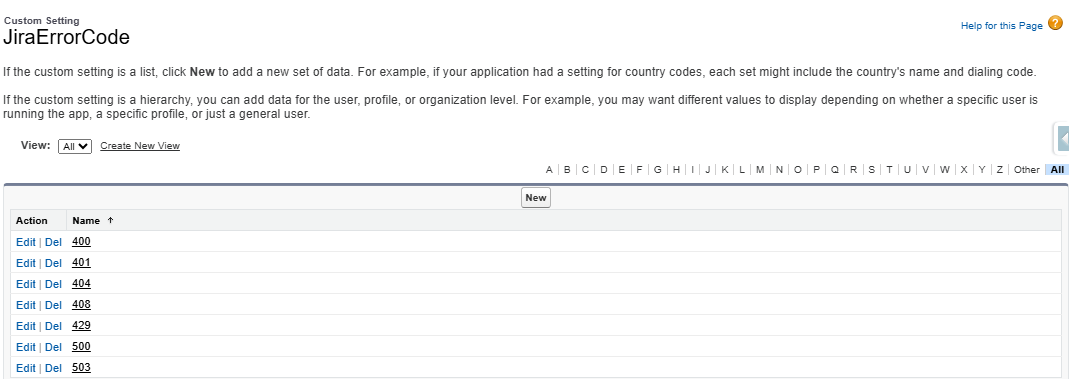
Once the package is installed, please verify that the status code 429 is present in the JiraErrorCode custom setting (Setup → Custom Settings → JiraErrorCode → Manage). If 429 is not available in this list, please add it; otherwise, Automated Error Handling will not detect or retry rate-limit errors.
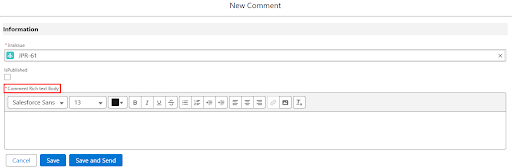
C. Rich Text Comment Body — Page Layout Update
Note: This step is only required if the Rich Text Comment Body field is not visible in the Jira issue comments after the upgrade. If the field is already displaying correctly, you can skip this section. Please follow the steps in this document to update the page layout: Rich Text Comment Body Page Layout Update.
2. Rich Text Support
With Rich Text support, formatted content including bold text, italic, lists, hyperlinks, and inline attachments is now fully preserved when syncing data between Salesforce and Jira, eliminating manual reformatting and ensuring users always see accurate, well-structured information on both platforms.
2.1 Rich Text on Jira Fields
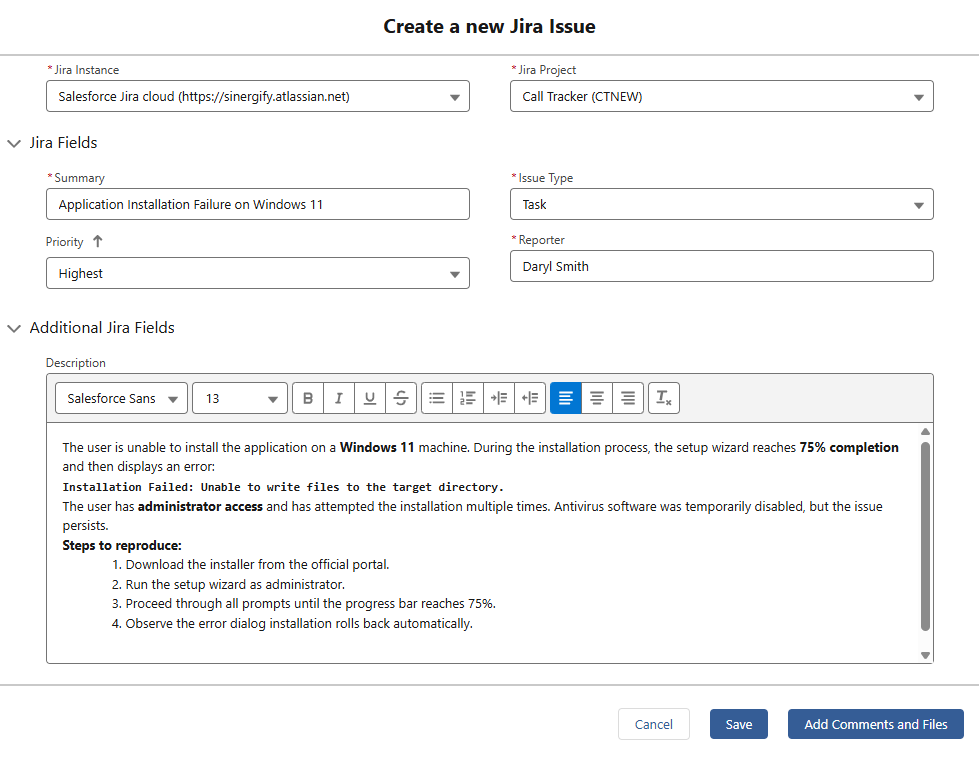
Sinergify now supports Rich Text formatting for Jira fields, allowing formatted content such as:
-
Bold and italic text
-
Lists and structured content
-
Hyperlinks
This improves readability and preserves formatting when data is synced between Salesforce and Jira. For a detailed list of supported Rich Text formats, refer to the Rich Text Detailed document.
2.2 Rich Text for Case Comments
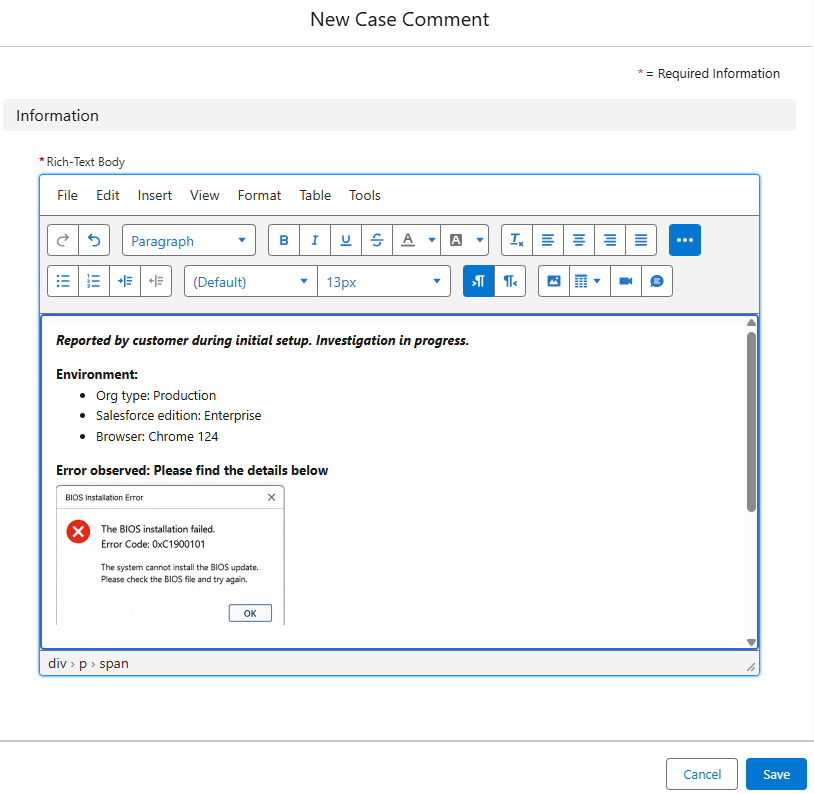
Rich Text formatting is now supported for Salesforce Case Comments, ensuring that formatting is preserved when comments are synced with Jira issues.
2.3 Additional Rich Text Features
-
Inline attachments are now supported in Salesforce Feed, Jira comments, Case comments, and emails.
-
Jira user mentions and tagging are now supported when adding Jira issue comments from Salesforce, improving collaboration by notifying the right users directly without requiring users to switch between Salesforce and Jira.
3. Troubleshooting
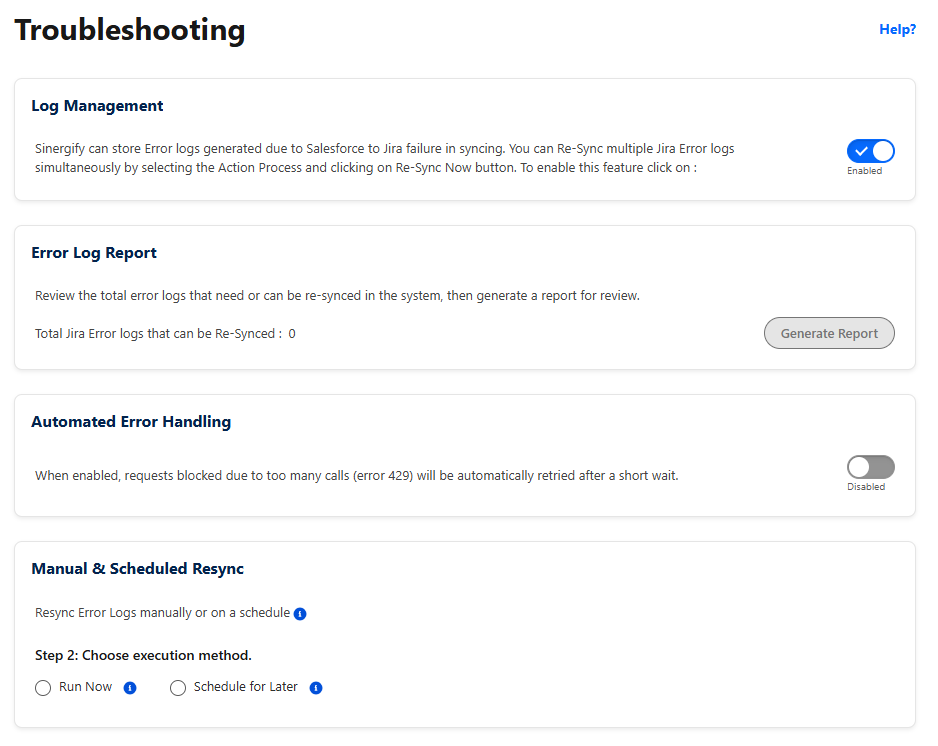
The Troubleshoot page has been redesigned into four clear sections: Log Management, Error Log Report, Automated Error Handling, and Manual & Scheduled Resync.
-
Automated Error Handling: Requests blocked by Jira rate limits (HTTP 429) are now automatically retried, up to 3 attempts, respecting Jira's suggested wait time, removing the need for admins to manually catch and re-trigger rate-limit failures.
-
Authentication errors (HTTP 401): Logged and surfaced to the admin with a re-authorization option, letting affected records be resynced in one action once reconnected, instead of tracking them down individually.
-
User notifications: Users get a bell notification when their sync is delayed due to rate limits, so they know it's in progress rather than assuming it failed.
4. Improved Search and Link Experience in Service Console
Support agents can now find and link Jira issues without leaving the Salesforce record page, making the experience seamless within the Service Console and reducing clicks for a smoother workflow.
-
In-place refresh: Jira Related List refreshes automatically after linking no page reload or redirection.
-
Numeric-aware search: Typing a numeric value (e.g., "88") now returns matching issue keys (e.g., SIN-88).
-
Responsive UI: The Search Jira Issue component is now fully responsive across screen sizes.
5. Sorting Support in Jira Related List
The Jira Related List now supports column sorting (for example, by Priority), helping users quickly locate and manage linked Jira issues within Salesforce.
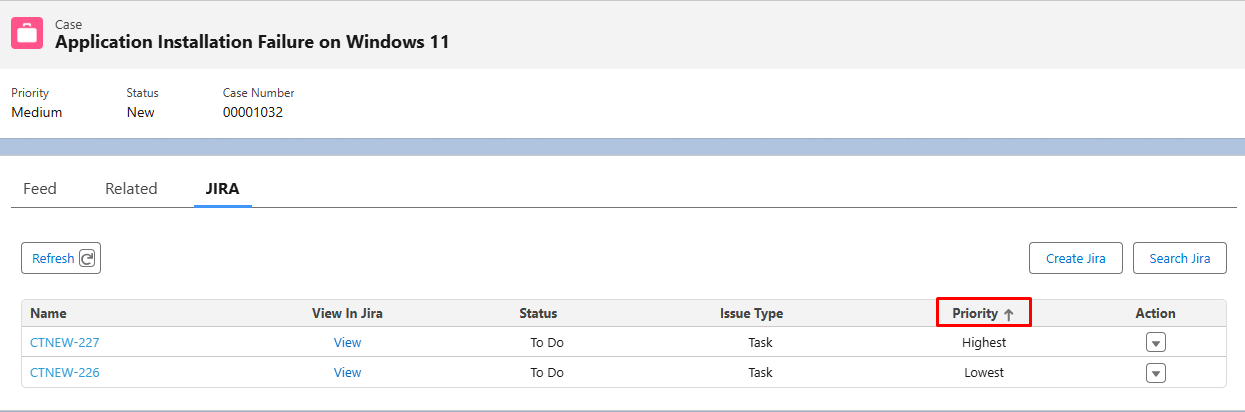
6. Status mapping
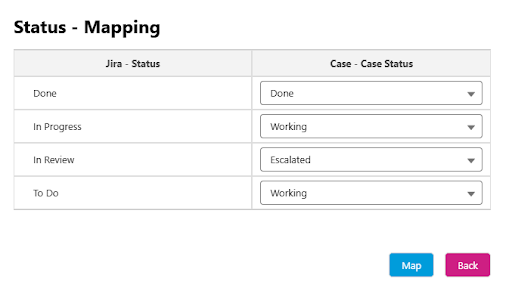
Redesigned the Status Mapping configuration to support One-to-Many mappings. Previously, each Salesforce Case Status could be mapped to only one Jira Status. With this enhancement, Jira Status is now the primary mapping field, allowing multiple Jira statuses to map to the same Salesforce Case Status. This simplifies configuration for organizations where multiple Jira workflow statuses should synchronize to a single Case Status in Salesforce.
|
Sync Behavior by Mapping Type |
|||
|
Mapping Type |
Target: Salesforce |
Target: Jira |
Target: Bi-Directional |
|
1:1 (One Jira = One SF status) |
✅ Works |
✅ Works |
✅ Works |
|
One-to-Many (Multiple Jira = One SF status) |
✅ Works |
⚠️ Logic should be handled via Flow |
⚠️ Logic should be handled via Flow |
Note: For One-to-Many mappings, Jira → Salesforce synchronization works automatically. If Bi-Directional synchronization is required, the synchronization logic should be implemented using Salesforce Automations.
Fixes / Improvements
|
Area |
Details |
|---|---|
|
Project Configuration and mapping |
|
|
Search Jira |
Handled a scenario where users received an unnecessary warning asking them to remove tab spaces after pasting copied text into the Search Jira and Global Search Jira pages. Users can now paste copied content and search seamlessly. |
|
Comments Sync |
Fixed an issue where comments manually synced from Jira using the JEditor Rich Text Editor displayed unwanted special characters and editor-specific formatting in Salesforce. The sync process now automatically removes these extra characters and tags, ensuring comments are displayed cleanly and accurately after manual synchronization. |
|
Authentication |
Fixed an issue where the authentication validation message was not displayed when switching between authentication tabs (OAuth 2.0, OAuth 1.0, and Basic Authentication). |
|
Feed item usage |
Handled a scenario where users could link Jira issues from unmapped Projects or Issue Types through Feed (#linktojira). The system now validates the Project and Issue Type before linking, ensuring only configured Jira issues can be linked. |
Version 6.55.5
Release Date: 18 May 2026
Package links:
Production:
https://login.salesforce.com/packaging/installPackage.apexp?p0=04tNS000000QpdB
Sandbox:
https://test.salesforce.com/packaging/installPackage.apexp?p0=04tNS000000QpdB
1) Rule Set Filter Logic Evaluation
Handled a scenario where rule set filter logic was not evaluating correctly when multiple conditions were configured in the criteria. Filter logic combinations such as 1 OR 2 and 1 AND (2 OR 3 OR 4) are now properly evaluated during rule set processing.
2) Jira Creation – Field Validation Improvements
Improved validation handling for required picklist and multi-picklist fields in the Create Jira form. Previously, in certain scenarios, mandatory picklist fields (including fields with sorting icons) were not validated correctly during Jira ticket creation, resulting in validation errors. With this update, the system now ensures proper validation of mandatory field selections before ticket creation.
Version 6.55.4
Release Date: 08 May 2026
Package links:
Sandbox:
https://test.salesforce.com/packaging/installPackage.apexp?p0=04tNS000000QODB
Production:
https://login.salesforce.com/packaging/installPackage.apexp?p0=04tNS000000QODB
-
Fixed STRING_TOO_LONG exception in Jira error logging (GenerateJiraLogs) by increasing Request Endpoint field limit and ensuring oversized Jira API URLs are handled properly within Salesforce field constraints.
-
Resolves the component error that crashed the UI when uploading files from the Salesforce Files tab.
-
Handled a scenario where updating user fields (e.g., Reporter, Reported By) did not always reflect the corrected value properly. In some cases, the system was not consistently capturing the updated value, and the first and last name values were not being fetched correctly Now, the selected user will be correctly fetched and reflected in the user fields as expected.
-
Handled a scenario where required fields (e.g., Due Date, etc.) were not enforced during Jira ticket creation, allowing tickets to be created without mandatory data. This is now addressed and proper validation is applied.
-
Resolved an issue where duplicate Jira fields were displayed on the Project Mapping screen when multiple issue types were configured.
Version 6.55.3
Release Date: 21 April 2026
Package links:
Sandbox:
https://test.salesforce.com/packaging/installPackage.apexp?p0=04tNS000000PbKX
Production:
https://login.salesforce.com/packaging/installPackage.apexp?p0=04tNS000000PbKX
Fixes
Infinite Loader on Create Jira with Required Multipicklist Fields Resolved an issue where clicking Save on the Create Jira dialog caused an infinite loading state when a multipicklist field was both mapped and marked as required on the Jira side.
Version 6.55.1
Release Date: 31 March 2026
Package links:
Sandbox:
https://test.salesforce.com/packaging/installPackage.apexp?p0=04tNS000000O7I5
Production:
https://login.salesforce.com/packaging/installPackage.apexp?p0=04tNS000000O7I5
-
1) OAuth 2.0 Scope Optimization (Jira Cloud)
-
Improved OAuth 2.0 authentication to support minimum required scopes only.
-
Previously, admin-level scopes (e.g., manage:jira-project, manage:jira-configuration) were required for authentication. This update removes that dependency and allows successful authentication using only:
-
read:jira-work
-
write:jira-work
-
read:jira-user
-
2) Attachment Sync Fix for File Corruption (Salesforce → Jira)
-
Fixed an issue where attachments synced from Salesforce to Jira were getting corrupted or appearing unusable for certain file types. This was happening due to unintended modifications during Base64 encoding while constructing the multipart request, which impacted certain files and caused issues like broken PDFs, images, and other documents. With this fix, the file content is now sent without any alteration, ensuring that the file bytes remain exactly the same as in Salesforce.
-
3) 401 Error Handling and Logging Enhancement
-
Improved handling of 401 (Unauthorized) errors by introducing structured logging and trigger-based processing. Whenever a 401 response is received, a log record is created for better tracking, visibility, and troubleshooting. The system also attempts to automatically refresh the access token, helping prevent repeated 401 errors and reducing failures in subsequent requests. Currently, this handling is supported for Jira issue creation, issue cloning, and field synchronization. In some cases, missing instance details in error logs prevent the refresh process from triggering this will be addressed in the next releases.
Version 6.55
Release Date: 11 March 2026
Package links:
Sandbox:
https://test.salesforce.com/packaging/installPackage.apexp?p0=04tNS000000MPvp
Production:
https://login.salesforce.com/packaging/installPackage.apexp?p0=04tNS000000MPvp
Package installation guide:
https://docs.sinergify.com/6.0/Lightning/installation.htm
1) Admin level Enhancements
-
Instances tab
-
Added the Refresh token in the OAuth 2.0 Authentication screen.
-
Configuration setting screen
-
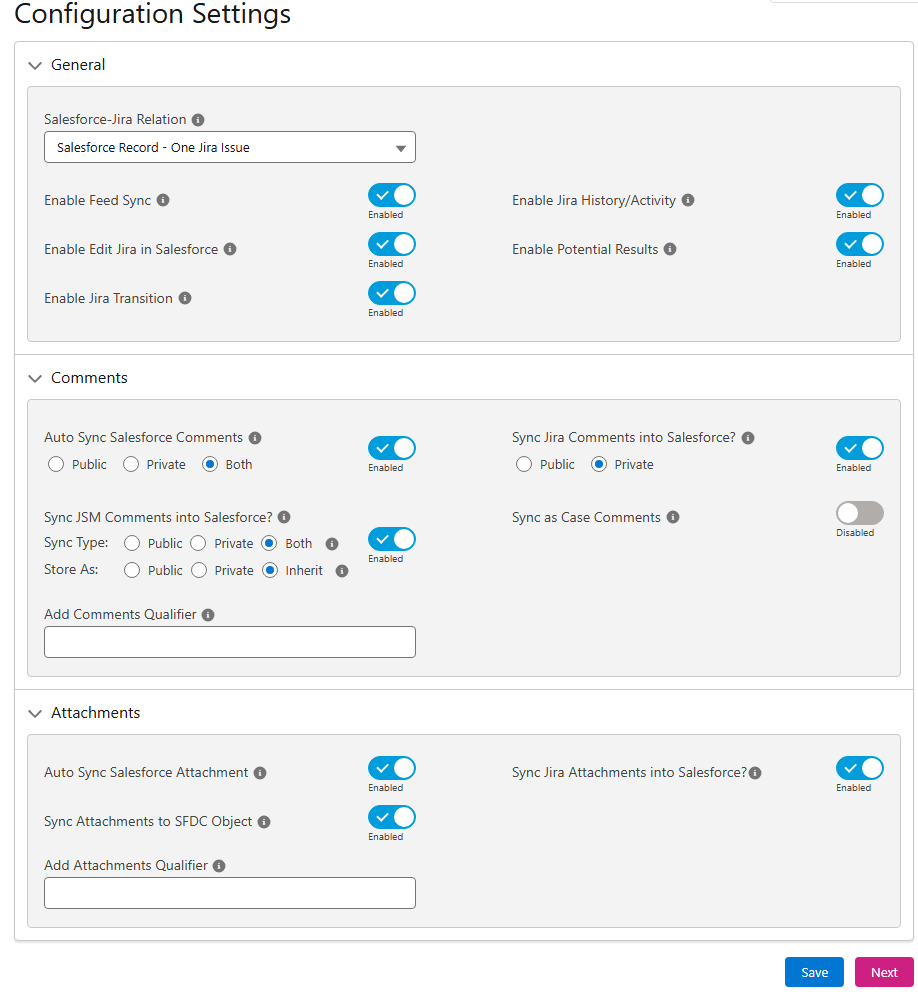
Revamped the UI with an improved layout and clearer grouping of options to make configuration settings easier to understand, navigate, and manage. This enhancement helps users quickly identify sync controls for comments, attachments, and Jira–Salesforce behavior, resulting in a more intuitive configuration experience.
-
Project Mapping screen
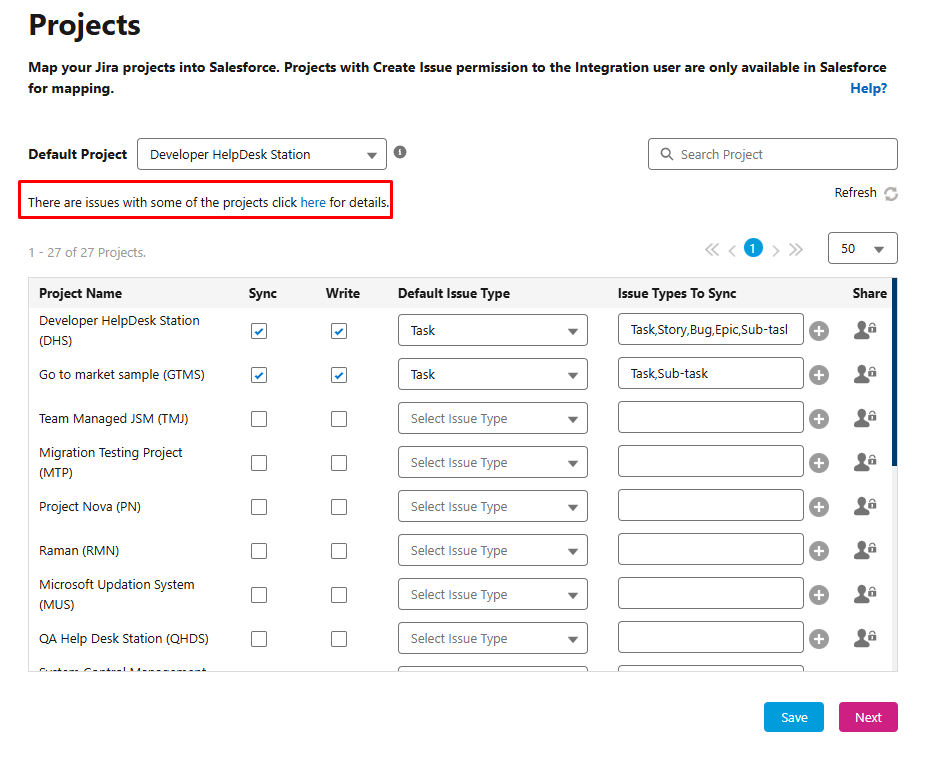
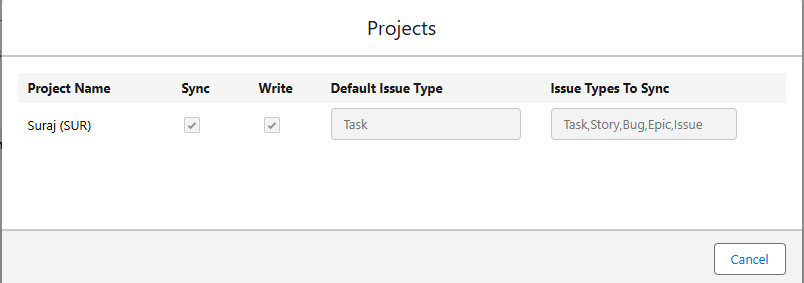
-
Added an option in the Salesforce side to track project access changes—either removed from Jira or due to permission changes.
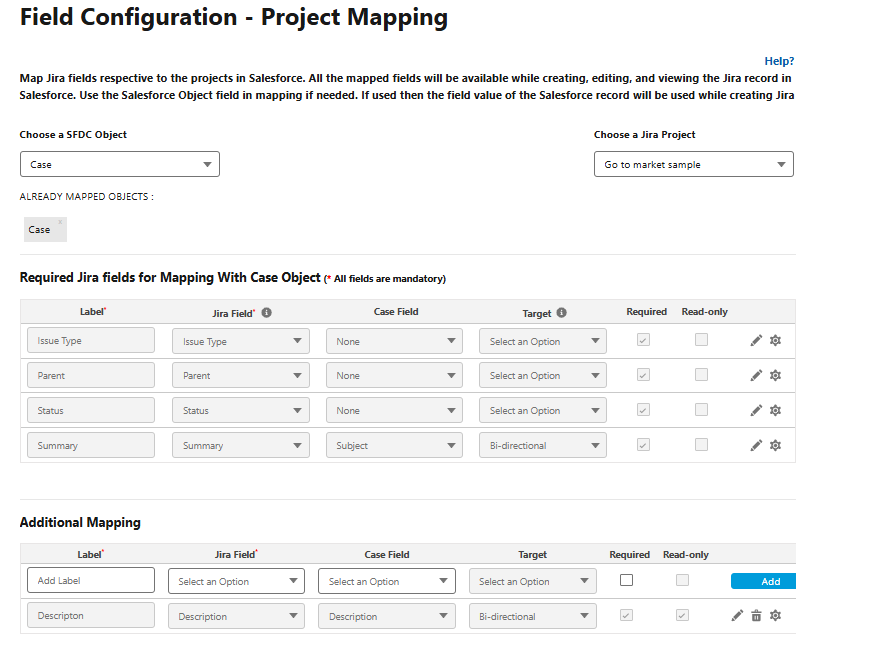
-
Enabled status and issue type mapping directly from the front end in the Field Mapping screen.
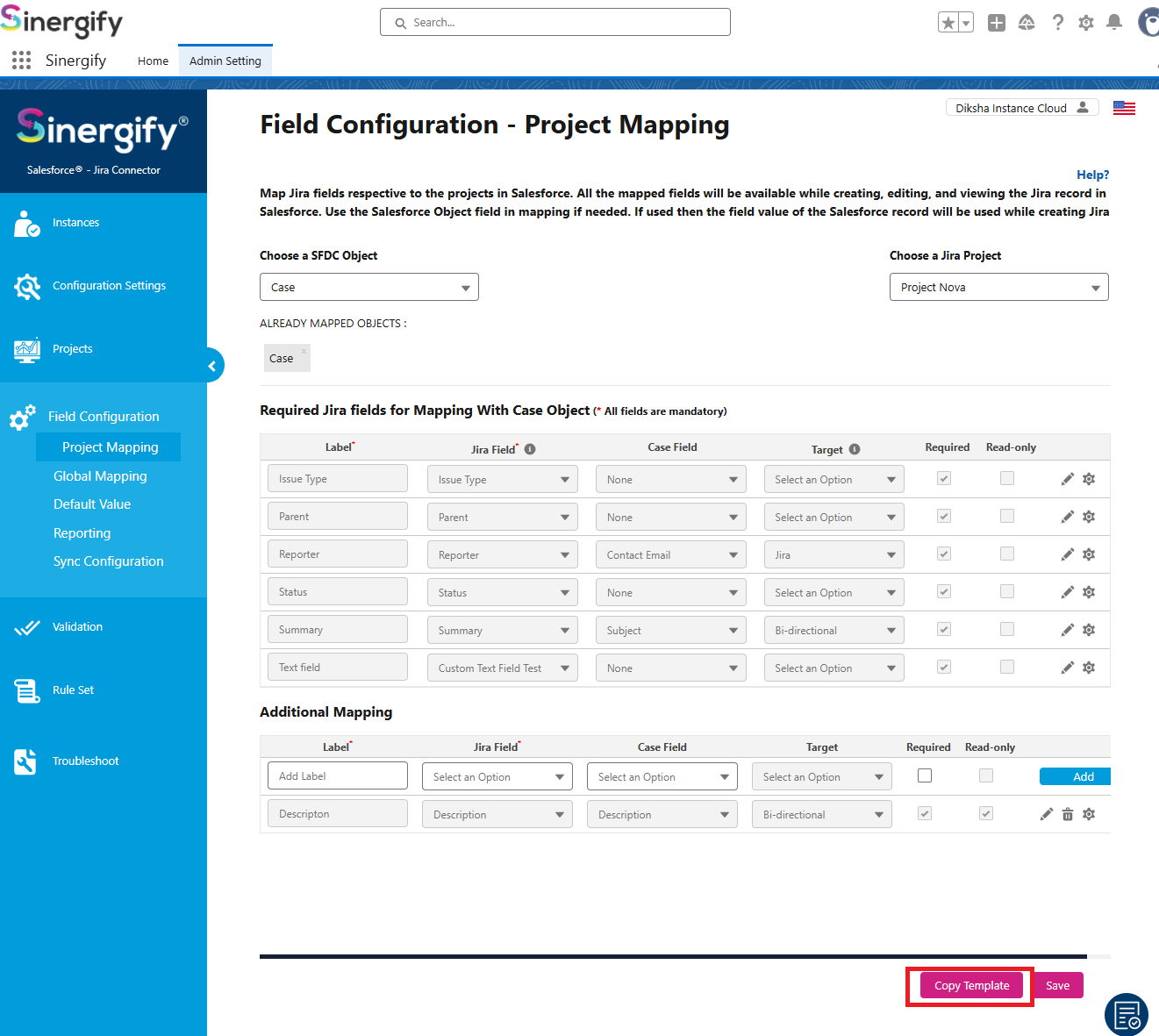
-
Introduced the Copy Mapping Template option that allows users to copy an entire project mapping configuration from one project to another. This is useful when the same field configuration and mapping setup needs to be reused, helping reduce manual effort, save time, and maintain consistency across projects.
-
Option in help guide
-
Added the troubleshooting option in the helpguide.
-
Added the option of Sync button in the Reporting.
-
Added an option in Admin Settings for Automatic Batch Scheduling of reporting fields. Previously, users had to manually copy and execute the batch in the Developer Console now it is automated.
2) Feature enhancements
-
Added a sorting icon next to single-select and multi-select fields on the Create, Edit, and Clone screens. Previously, values were displayed in alphanumeric order by default, but users can now sort the display order using the available sorting options, including ascending (A–Z) and descending (Z–A).
-
Ability to populate the values of the MultiSelect Picklist based on the object field value.
-
Handle Non-Unicode Characters(such as U+FFFF / ?) in Description. Previously, linking a Jira issue from the search screen could fail if the description contained non-Unicode characters (for example, characters such as U+FFFF). This sometimes caused errors during the linking process and affected data synchronization. With this update, non-Unicode characters in the description are now handled gracefully during the linking process.
-
Added an option to map picklist transform values using API names instead of labels. Previously, transform mappings were based on picklist labels, which caused incorrect or missing values during Jira issue creation when the label and API name differed.
-
Handled Jira project deletion events on the Salesforce side. Previously, users had to manually delete old project mappings in Salesforce to view updated projects; this is now handled automatically.
-
Optimized the Admin Settings to fetch the Salesforce object list independently instead of through a common load call. This enhancement improves field mapping performance and prevents CPU time limit exceptions in orgs with a large number of objects (1500+). The update ensures smoother loading and better stability of the Admin Settings page in high-object-count environments.
-
Implemented multilingual support for English, Chinese (Simplified), Chinese (Traditional), Russian, Japanese at an initial level by converting hardcoded UI text into translatable labels and enabling language adaptability across key screens. Further enhancements, broader UI coverage, and additional refinements will be introduced in upcoming releases to strengthen overall multilingual consistency in 2026
-
Enhanced the “Send Emails to Jira as a jira comment” feature to improve email identification in the popup by displaying the first 30 characters of the email body when the subject is empty and showing a concise preview on hover, making it easier for users to select the correct email before sending it as a Jira comment.
3) Bug fixes/Improvements
-
Resolved the field name length issue for reporting fields.
-
New package Triggers will now be automatically added to custom settings when the Sinergify package is installed or updated.
-
Resolved the infinite loader issue on the Global search Jira page.
-
Validation Screen: Updated and refined error messages to provide clearer guidance and improve user understanding during validation.
-
Fixed an issue where, in a one-to-one relationship, linking multiple Jira issue keys using #sendtojira in feedposts resulted in no Jira issues being linked.
-
Resolved an issue where the auto-create troubleshooting scheduler was creating duplicate records in some scenarios.
-
Improved authentication error handling with clearer validation messages for failed authentication attempts.
-
Resolved an issue in the Troubleshooting tab where clicking Resync Now triggered an incorrect “Please select a valid time” validation error when the scheduling option was not enabled.
Version 6.30.2
Release Date: 1 Feb 2026
-
1. Salesforce ↔ Jira Attachment Upload Fix
-
Affected Version: All versions
-
Resolved an issue where attachments were failing to transfer between Salesforce and Jira in both directions due to recent changes in Jira’s REST API header validation. The headers in the Apex classes have been updated to comply with Jira requirements, ensuring successful attachment uploads from Salesforce to Jira and from Jira to Salesforce.
-
2. Sinergify Reporting Screen
-
Affected Version: 6.30
-
Resolved an issue where reporting data in Sinergify Admin Settings was not loading as expected.
Version 6.30
Release Date: 20 Nov 2025
-
1. OAuth 2.0 Token Timeout Configuration Enhancement
-
Handled delayed responses from Jira during OAuth 2.0 token generation by introducing a configurable timeout through the new OAuth2Timeout field in the JiraSalesforceDetail custom setting. This prevents read timeout errors and ensures smoother, more reliable authentication.
-
Affected Version(s): All versions
-
2. Handle Null HTMLBody for Email Messages
-
Resolved an issue where Salesforce Email Messages with a null HTMLBody were not displayed in the Sinergify Jira Plugin. With this fix, such emails now render correctly, ensuring users always see the complete communication history without missing entries.
-
Affected Version(s): All versions
Version 6.29
Release Date: 13 Oct 2025
-
1. Jira Boolean Conversion Fix
-
Resolved an issue in the JiraToSFRest class where boolean conversion failed for null or invalid string values in the payload. Boolean values are now correctly processed: "true" converts to true, "false" converts to false, and null, missing keys, or invalid strings safely default to false. The internalFlag behaves as expected in downstream logic, and no runtime exceptions occur during conversion.
-
Affected Version(s): 6.26
-
2. OAuth 2.0 Activate Content Header Fix
-
Resolved an issue where the OAuth 2.0 authentication process did not properly handle the “Activate Content Header Parameter” toggle, causing authentication failures when the toggle was enabled. The fix ensures that the OAuth 2.0 request includes the necessary Content-Length header for successful authentication. Existing functionality when the toggle is disabled remains unaffected.
-
Affected Version(s): 6.0
Version 6.28
Release Date: 10 Sept 2025
-
1. Package Installation and Updation Fix
-
Resolved an issue where package installation or upgrades could fail on some Salesforce instances and impact existing Sinergify functionality when the Enhanced Emails feature was disabled. The dependency on Enhanced Emails has been removed, allowing installations and upgrades to complete successfully without this setting, while preserving all core functionalities.
-
Affected Version(s): 6.26
-
2. Jira Error Logs – URL Field Length
-
Fixes an issue where the URL field in the Jira Error Logs object had a limited length of 1,000 characters, which could prevent some records from being stored fully. In this release, the field length has been increased to 35,000 characters, ensuring errors are properly logged and the Jira Error Logs object can be fully utilized.
-
Affected Version(s): All versions
Version 6.27
Release Date: 27 August 2025
-
Search Jira Page:
-
Resolved an issue with the previous release where the status field was not displaying in the search column.
Affected Version(s): 6.26 -
Handled a scenario where unmapped Jira issue types appeared in the Search Jira screen in Salesforce when no issue type was selected. Now, search results are restricted to only mapped issue types, ensuring relevant results as per the mapping.
Affected Version(s): All versions
-
-
Sinergify Admin Settings
-
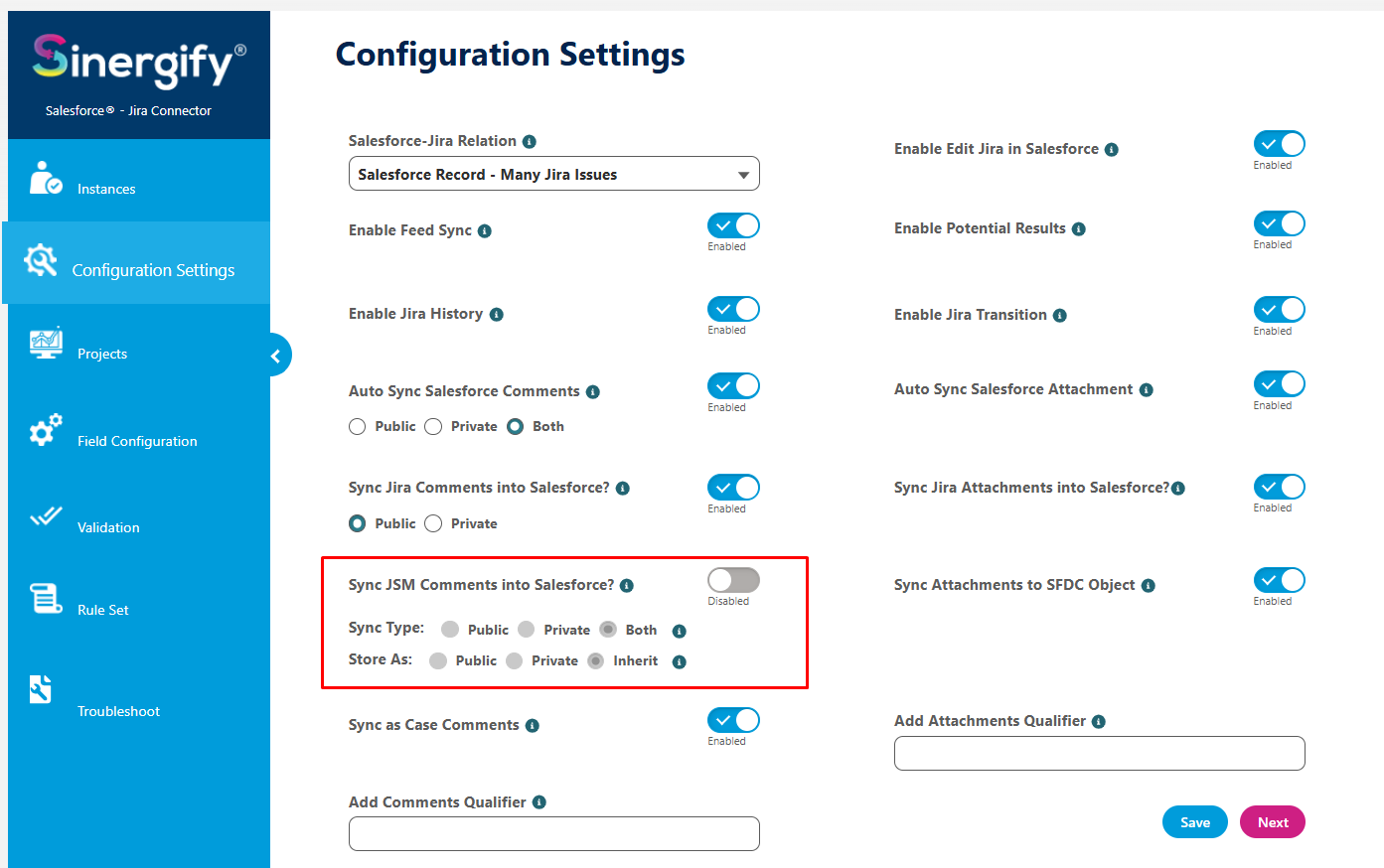
Added a new configuration option to control how Public and Private comments from Jira Service Management (JSM) projects are synchronized into Salesforce. This provides admins with greater flexibility and control over comment handling for JSM projects.
-
Version 6.26
Release Date: 12 August 2025
-
Addresses the deprecation of Jira REST API endpoints by Atlassian by implementing the latest API handling within the Sinergify package. The following features were affected: Jira issue search, potential results, and global search within Salesforce. The update ensures continuous and reliable operation of these essential functions, providing seamless integration and accurate synchronization of Jira data. For detailed information, please refer to the Atlassian announcement.
Version 6.24
Release Date: 07 July 2025
-
Fixed an issue where using the Resync option in the Jira Error Log feature, after a failed automatic Jira ticket creation, saved the link in Salesforce incorrectly, resulting in duplicate records.
-
Minor changes in webhook regarding the status syncing in salesforce.
-
Self-Signed Certificate for Stable Integration: We have added the functionality to secure the connection between Salesforce and Jira by implementing a self-signed certificate. This addresses the issue caused by the proxy on the Jira side and the dynamic IP changes in Salesforce Hyperforce, which made static IP whitelisting impractical. This functionality ensures a stable and secure integration with consistent data synchronization.
-
Resolved a component error in the search screen that occurred when the default project was set to none.
-
Resolved an issue where users encountered a “System.NullPointerException: Attempt to de-reference a null object” error when updating comments coming from Jira to Salesforce using Qualifiers.
Version 6.23
Release Date: 27 June 2025
-
Resolved an issue where the email body in the Jira Emails tab displayed raw HTML and placeholder values (e.g., {sender.Name}) instead of properly formatted content. This fix enhances readability and improves the user experience when viewing email details in Salesforce.
-
Fixed an issue where searching for Issue Types containing an underscore (_) did not return any results. The search functionality now correctly supports special characters in issue type names.
-
Addressed a problem where inline attachments added in Jira comments were not visible under the Files tab in Salesforce when using Jira Server.
-
Resolved an issue where Jira comments synced to Salesforce were displaying raw HTML hyperlinks instead of readable text. This problem affected the clarity of comments, especially when user mentions or issue links were included. With this fix, comments now show clean display names and properly formatted links, greatly enhancing readability and improving the overall user experience.
Version 6.22
Release Date: 03 June 2025
-
Minor hot fixes.
Version 6.21
Release Date: 03 June 2025
-
Fixed the issue where the Reporter field was not populating during Jira auto-creation when the setting was configured to use the Salesforce logged-in user.
-
Minor bug fixes.
Version 6.20
Release Date: 02 May 2025
-
Jira Plugin changes on the Salesforce side regarding the email attachments.
Version 6.19
Release Date: 29 April 2025
-
Minor Bug fixes.
Version 6.18
Release Date: 28 April 2025
-
Changes in the apex class to handle the issue on the Jira side plugin.
Version 6.17
Release Date: 21 April 2025
-
Updated the Salesforce package to support the bulk case creation feature on the Jira side.
-
Resolved an issue where the Rule Set incorrectly stored the picklist label instead of the API value, causing mismatches during rule evaluation. The logic has been updated to consistently store and use the API name, ensuring accurate rule execution.
-
Limit Checks in Trigger Handlers
Introduced limit checks to trigger handlers to improve the processing of large datasets and prevent Salesforce governor limits from being exceeded in the package. This enhancement optimizes system performance, minimizes the risk of failures.
Version 6.16
Release Date: 20 March 2025
-
Fixed an issue where duplicate issue types appeared in JQL on the Search Jira page.
-
Enhanced handling of special characters for Auto-creation of Jira ticket from salesforce, manual creation, and Salesforce-to-Jira updates.
-
Added checks for triggers to prevent exceeding DML limits, query limits, and record limit exceptions, improving system stability.
-
Modified Search Jira to handle alphanumeric project keys and issue types containing underscores (_).
-
Resolved an issue where Name Linking and Search Jira both established relationships for the case number, causing duplicate records.
-
Minor fixes on the Jira related list lightning.
Version 6.15
Release Date: 19 February 2025
-
Resolved the issue with auto-creation for picklist field values.
-
Handled the People datatype field for JSM team-managed projects.
-
Increased the rule set limit to allow up to 200 rule sets.
Version 6.14
Release Date: 05 February 2025
-
Handled scenarios related to special characters, reserved keywords, and added delay for a few seconds to search issues on the Search and Global Jira Component.
-
Error Handling on Name Linking and Record Mapping Feature.
-
Error Handling on the Jira to Salesforce comment syncing via the Jira Plugin.
-
UTF-8 Characters, Conversion fixes, and Error Handling on Case to Jira Syncing.
-
Error Handling on Jira to Salesforce Attachment Syncing on Abort jobs.
Version 6.13
Release Date: 10 Dec 2024
-
Minor Fixes on Jira error log object.
-
Minor fixes on Case to Jira syncing.
-
Added the Generic Object Utility on Jira Issue Detail Page.
Version 6.12
Release Date: 05 Dec 2024
-
Minor changes related to Oauth 2.0.
Version 6.11
Release Date: 26 Nov 2024
-
Made minor changes to add the compatibility with Agentforce extension package.
Version 6.10
Release Date: 12 Nov 2024
-
Made minor changes to add the compatibility with Agentforce extension package.
Version 6.9
Release Date: 11 Nov 2024
-
Minor bug fixes.
Version 6.8
Release Date: 04 Nov 2024
-
Introduced the Agentforce in Sinergify.
Version 6.7
Release Date: 28 Oct 2024
-
Handled the required fields for the Label data type.
-
Minor fixes.
-
Handle the special character issue for the Jira Summary field.
Version 6.6
Release Date: 14 Oct 2024
-
Minor changes
Version 6.5
Release Date: 30 Sept 2024
-
Handle a Large Comment Body without new line and space in the Send Comment Attachment Custom component.
-
The Jira large author name should be updated on the Jira Issue Comment object in the author and updated-author fields.
Version 6.4
Release Date: 26 Sept 2024
-
The private key storage in Oauth 2.0 has been increased to 15 fields, allowing for more flexible data management.
Version 6.3
Release Date: 23 Sept 2024
-
Minor fixes in Oauth 2.0
Version 6.2
Release Date: 17 Sept 2024
-
Minor fixes in the Jira issue Migration Batch.
Version 6.1
Release Date: 10 Sept 2024
-
Minor fixes on the Multiple Jira instance linking.
Version 6.0
Release Date: 2024-08-13
Configuration Enhancements
-
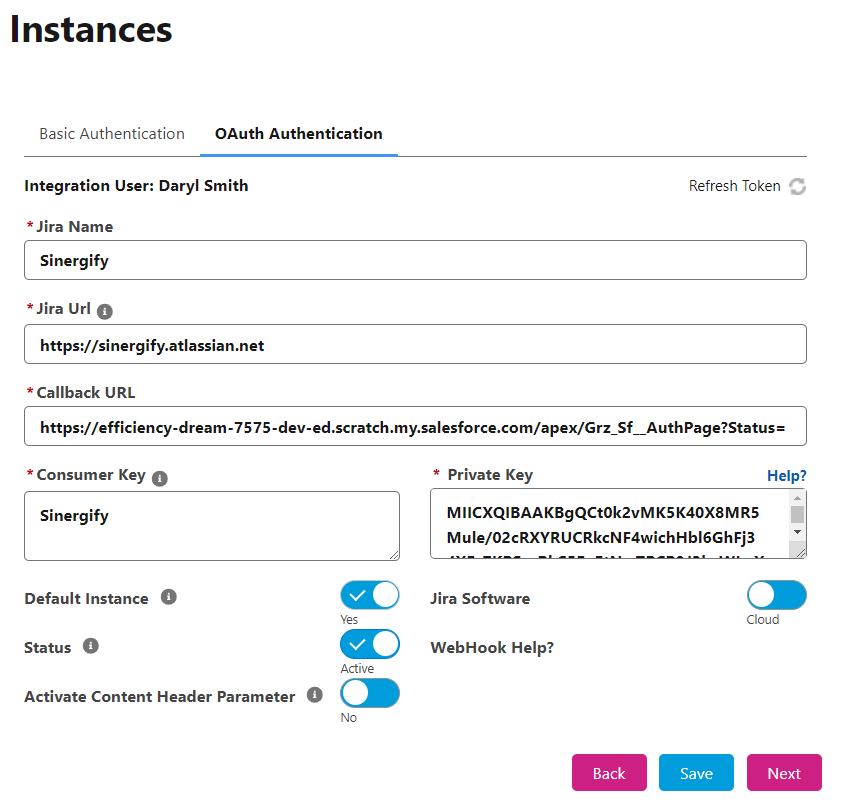
OAuth Authentication now supports authentication via Google SSO and the authentication screen also shows integration user name as well.
-
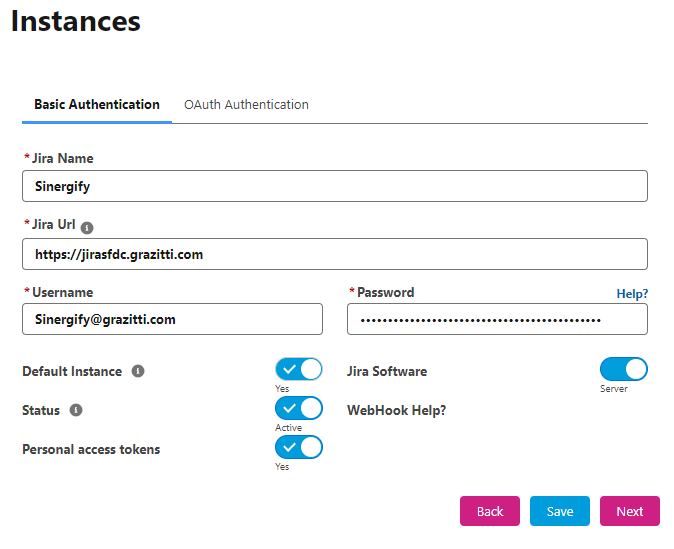
Basic Authentication now supports personal access tokens created from Jira server/Datacenter.
-
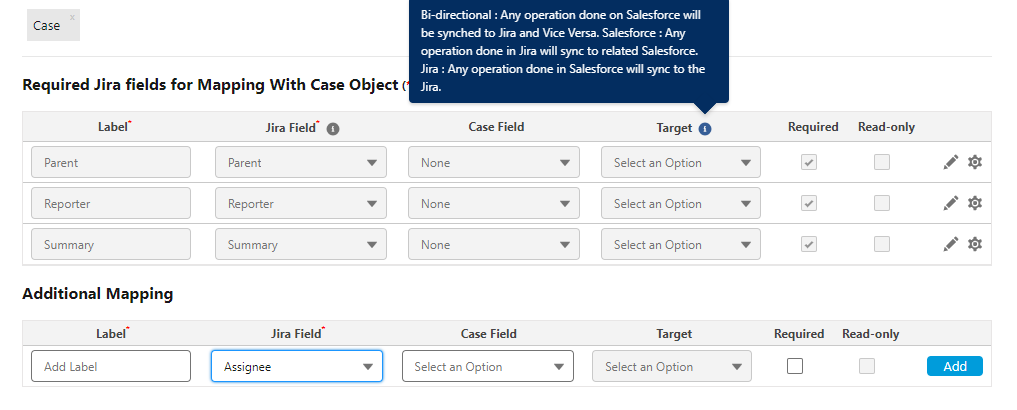
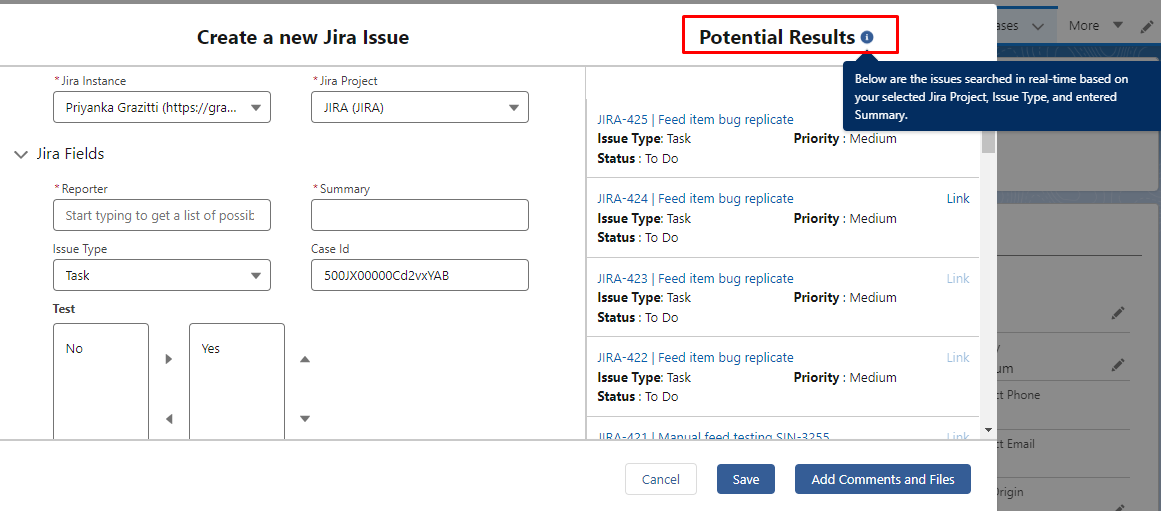
Added help texts to the Project Mapping, Potential Results and various other sections for better understanding.
-
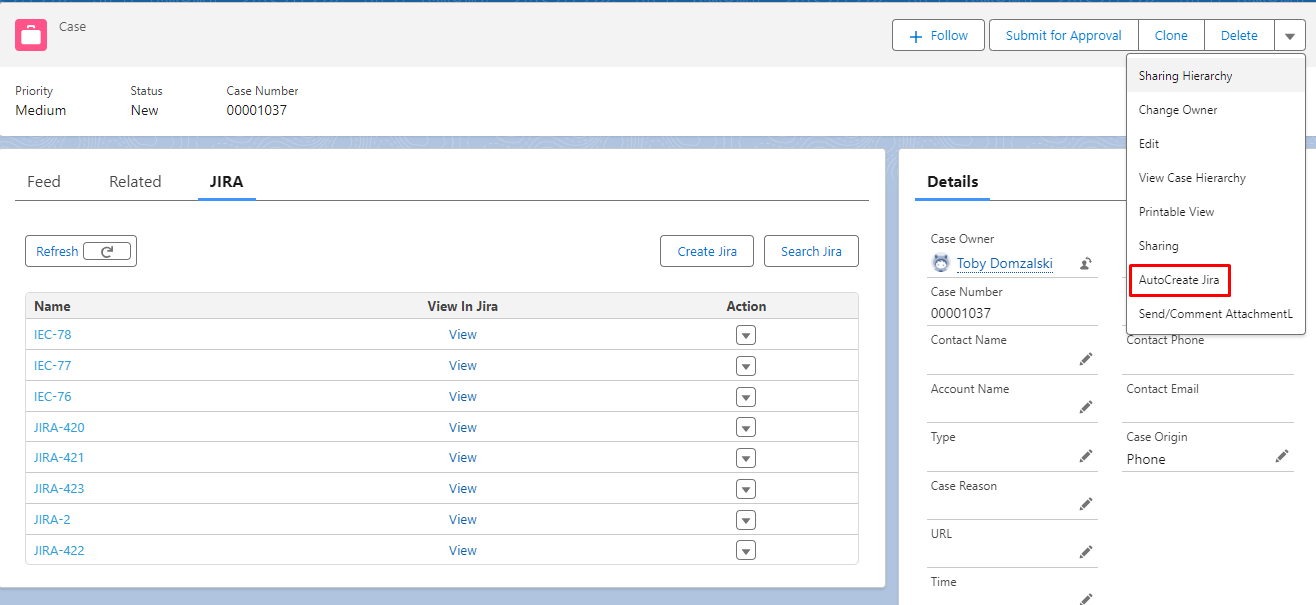
‘AutoCreate Jira’ quick action is now part of the Sinergify package and can be used for Creating Jira via automation.
-
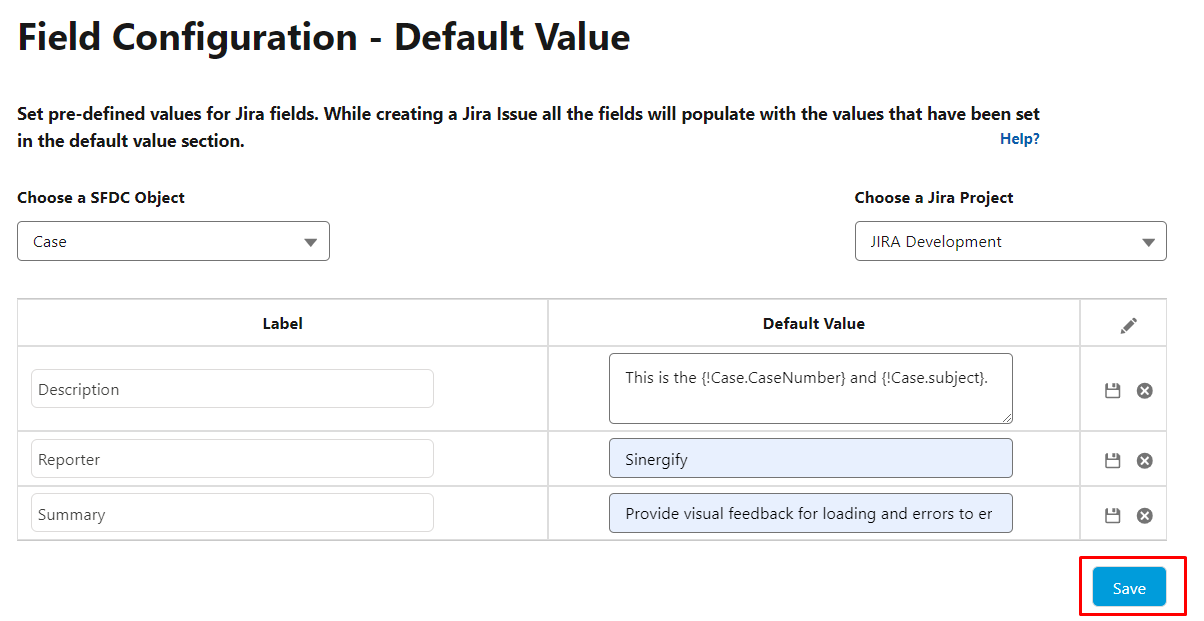
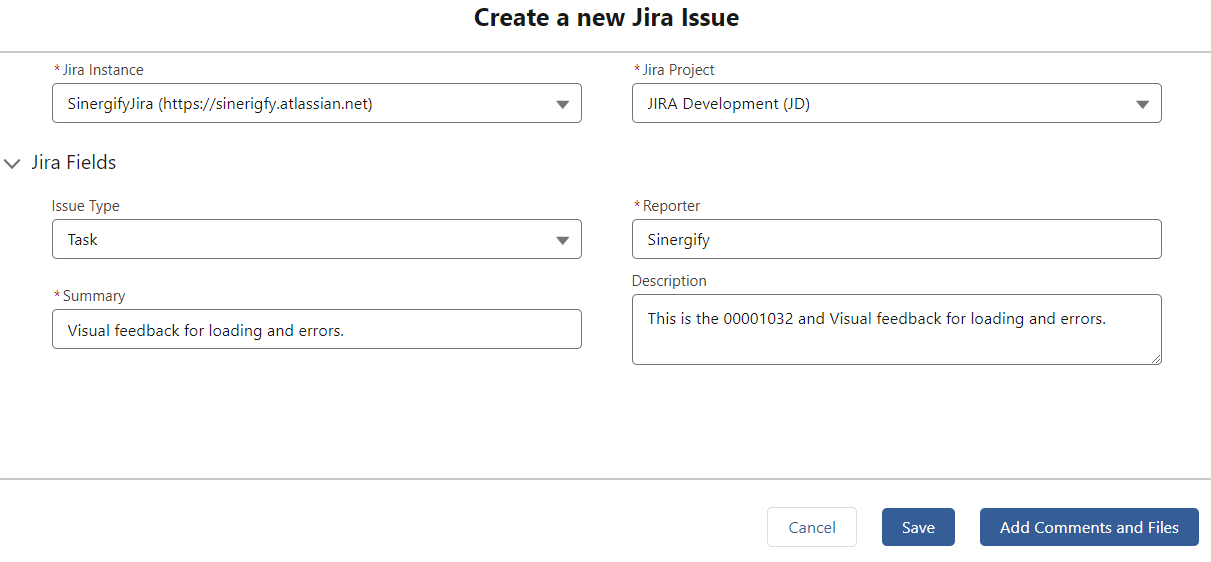
The Create Jira Page now supports dynamic values instead of static text.
Feature Enhancements
-
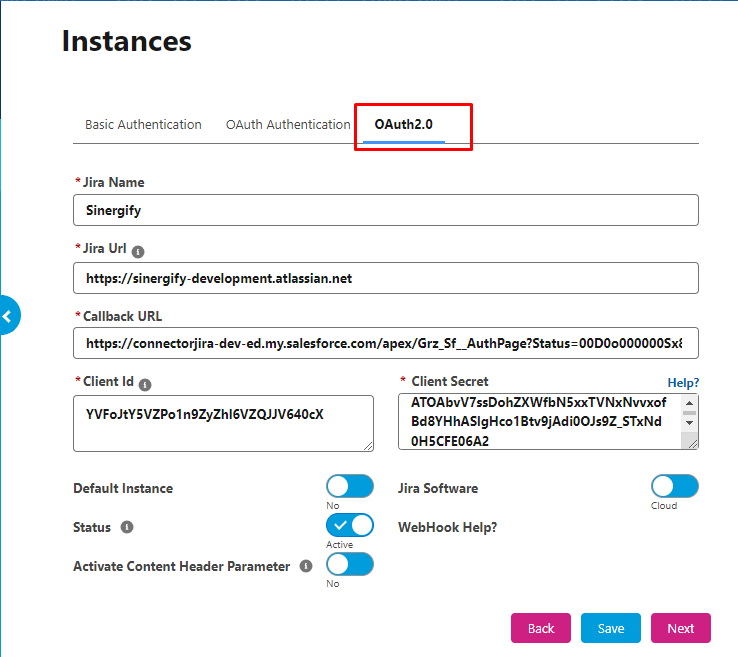
Introducing OAuth 2.0 support, providing a streamlined and secure authentication process for a more efficient integration experience.
-
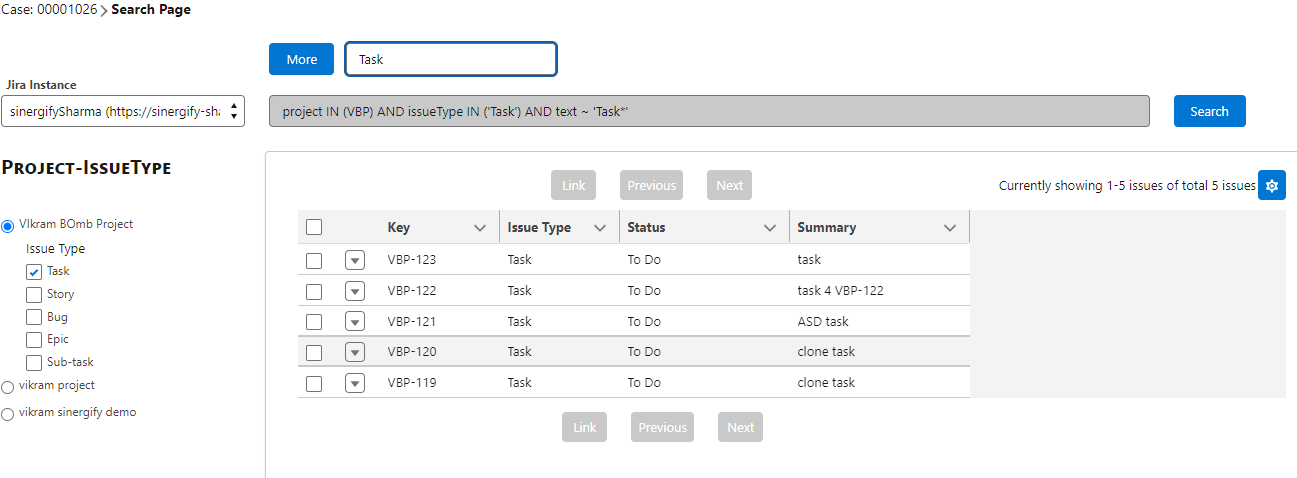
Search Jira now provides users with a robust tool for conducting highly specific queries, allowing precise location of project information.
-
Search by project name, issue type, assignee, Reporter, or issue key.
-
Search fields are categorized by picklist, user, text, date, and label, all conveniently displayed on the Search page.
-
Quick Filters can now be saved per user basis and won't disappear after refreshing the page.
-
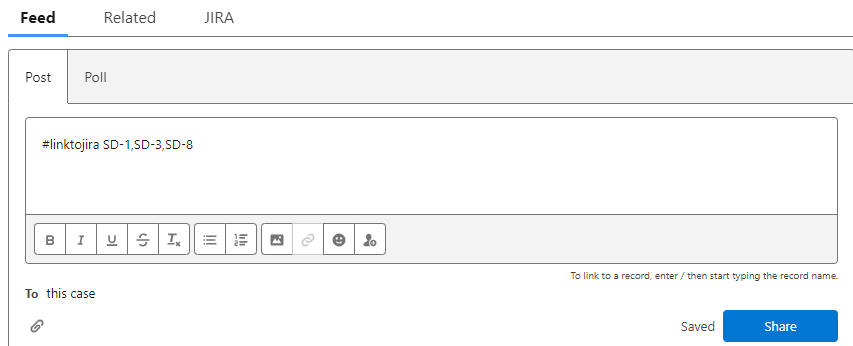
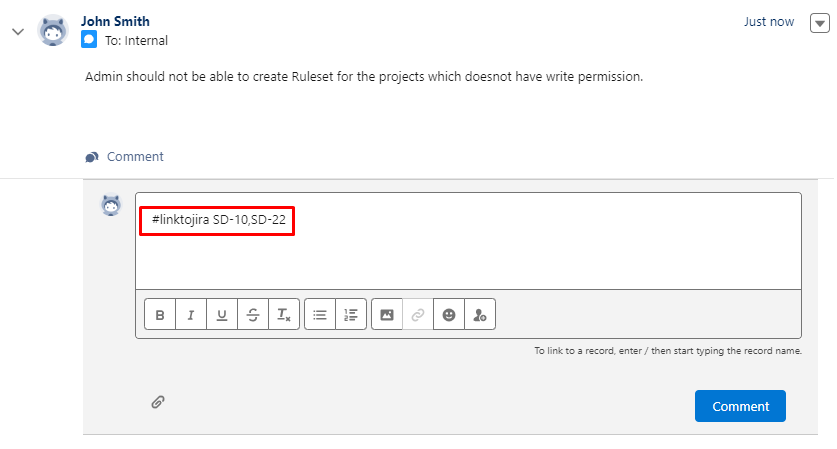
Ability to link Multiple Jira issues through feed and feed comments by using #linktojira.
-
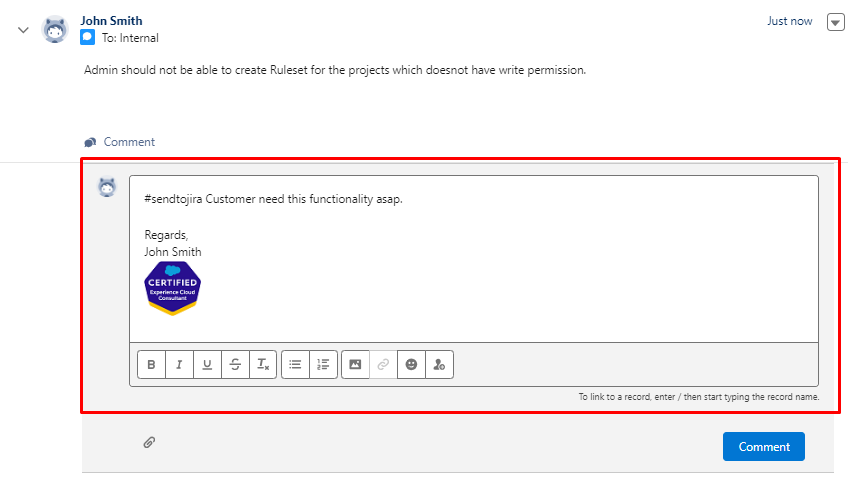
Ability to send the attachment to Jira issues through feed comments by using #sendtojira.
-
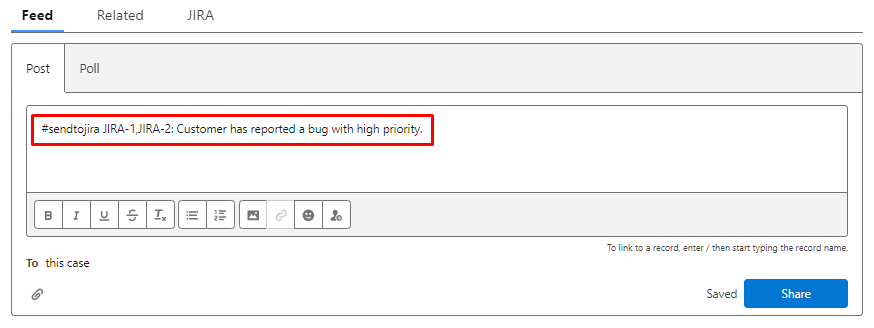
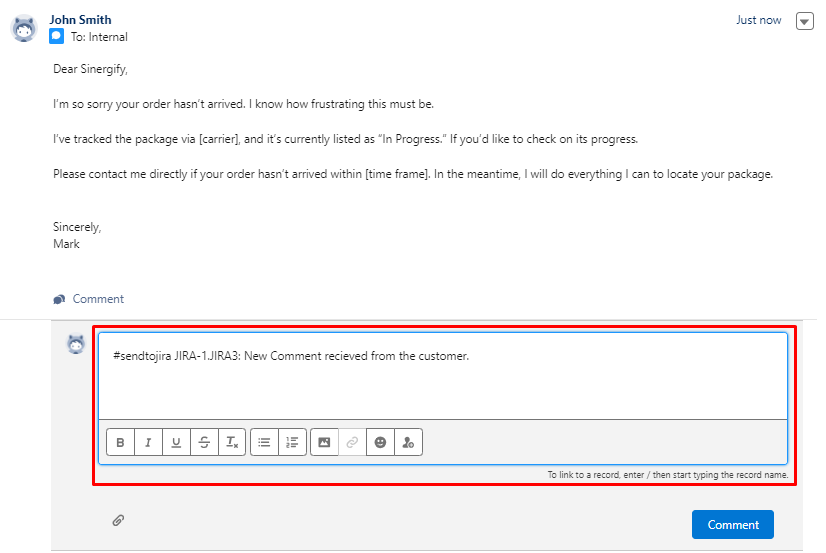
Send comments and attachments from feed and feed comment to multiple linked Jiras.
-
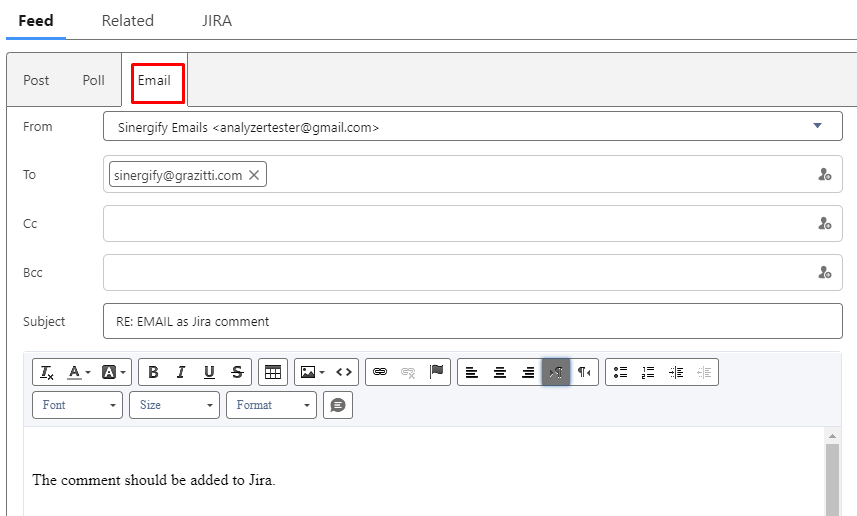
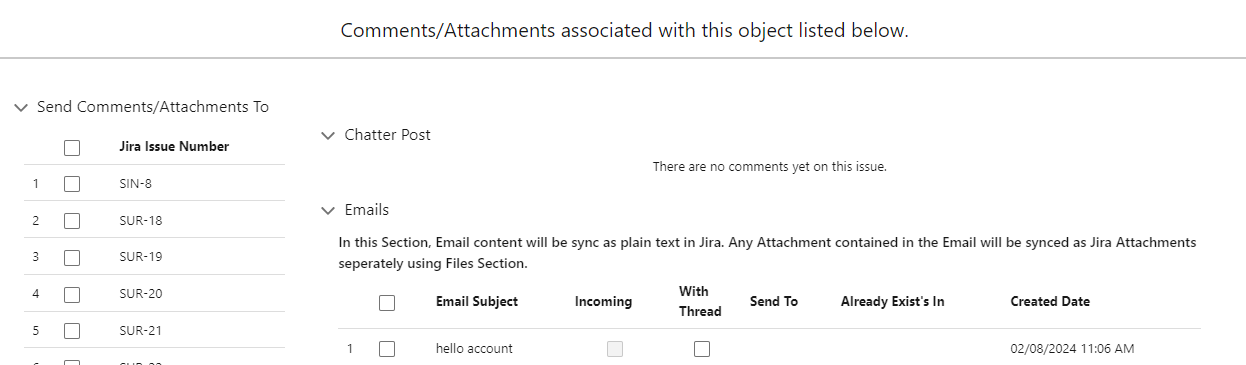
Provided an ability to send Case emails to Jira as Jira Comments. This feature allows agents to manually send selected emails from Salesforce Cases to Jira as comments.
Optimizations
-
Fields are created in the Jira issue object for handling large JSON data.
-
Handle the Qualifier Case-In-sensitive.
-
On the Create Jira Screen, the data values within the label field can be searched.